
App Cloner includes a networking feature called Host mapper, which lets you redirect requests from one host to another host name, IP address or port.
This is helpful for inspecting, intercepting or modifying an app’s network traffic.
You can define one or more redirection rules in the format A → B, where traffic to host A is redirected to host B. Both A and B can be host names or IP addresses, and wildcards are supported. For example, http://www.google.com matches only that exact domain, while *.google.com matches any subdomain.
You can also specify ports. If A includes a port (e.g. http://www.google.com:80), the rule only applies to that port. If B includes a port (e.g. 192.168.0.10:8443), the request will use that port instead of the original.
To handle both HTTP and HTTPS separately on custom ports, you may need two rules. And if you’re forwarding HTTPS traffic to a proxy or interceptor, enabling the Trust all certificates option may be required to avoid SSL handshake failures.
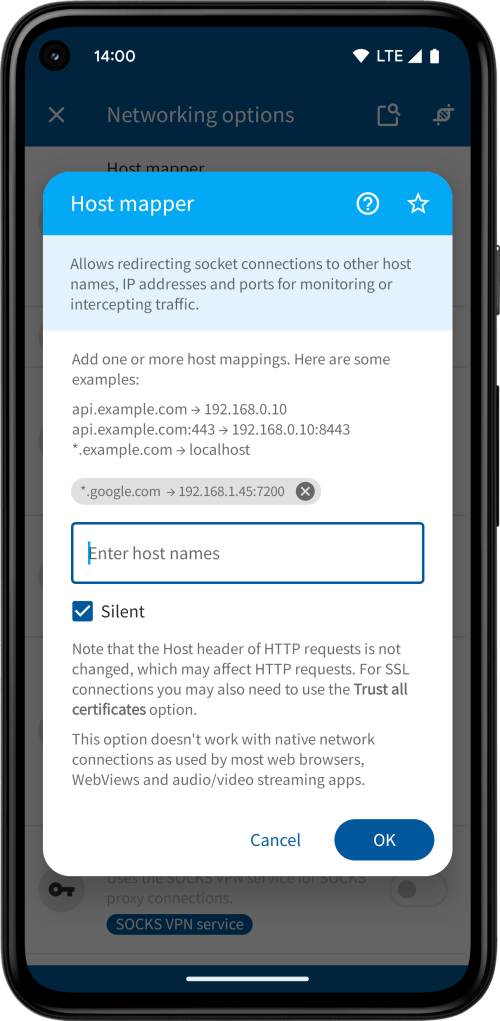

By default, a notification appears whenever a request is made to a new host, whether it’s mapped or not. You can check Silent to turn off these notifications.
The Host mapper option works at the socket level, not the HTTP level. This means it doesn’t modify the HTTP Host header. If the server expects a specific Host header, the request may fail.
This option is not compatible with the Hosts blocker, you can only enable one of them at a time. Still, you can simulate blocking by redirecting traffic to an invalid destination like localhost or 127.0.0.1.
Just like the Hosts blocker option, the Host mapper option doesn’t affect native network connections, which are commonly used by browsers, web views and media streaming apps.
Host mapper is available with the Yellow package.
 App Cloner
You must be logged in to post a comment.